

#Using Trace API
Trace allows you to add custom trace events to your code, helping you track specific operations or logic flows. This is useful for profiling custom business logic, measuring durations, or marking important points in your app.
- For Frontend Developers: You might want to measure the execution timing of a hook or component lifecycle method to understand rendering delays or side effect durations. For example, tracking how long a
useEffecthook takes; - For Android/iOS Developers: You may want to profile how long it takes to load a Lynx Bundle, parse resources, or execute a specific NativeModule call. Custom trace events help you pinpoint slow operations within complex workflows;
By adding custom trace events, you transform opaque code sections into visible, measurable segments in Trace’s timeline, enabling precise performance tuning.
#How to Use
#Slice Events
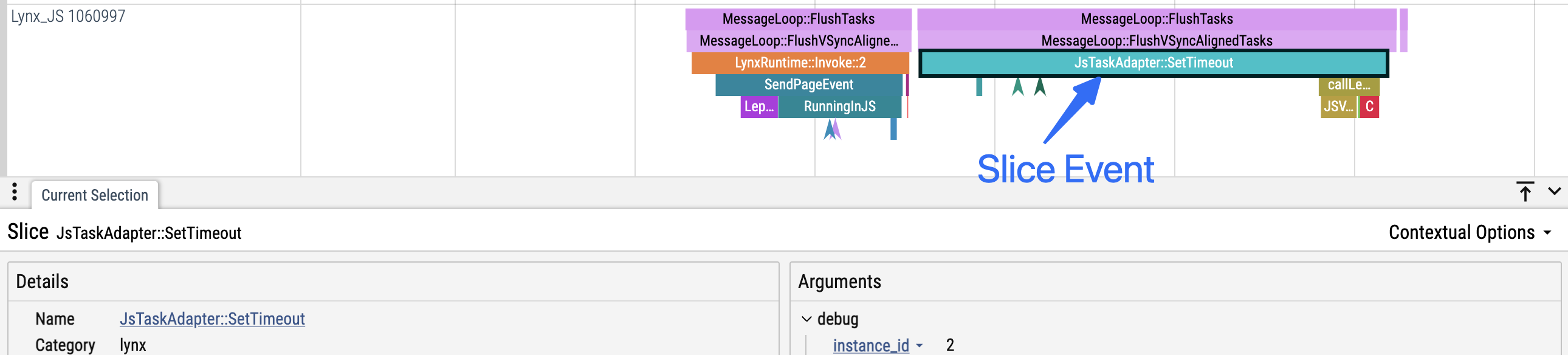
- Definition: Slice events have both a start and end timestamp, representing a duration.
- Nesting: On the same thread, slice events can be nested like a call stack.
- For example, if event B starts after event A but before A ends, B is considered a child of A and will be displayed nested under A in the Trace UI.
- Important: Child events must always end before their parent ends (i.e., B must end before A).
- Use case: Suitable for profiling code sections where execution time matters.
// Basic usage
- (void)measure {
  [LynxTraceEvent beginSection:@"render" withName:@"measure"]; // 'measure' slice start
  // ... your code ...
  [LynxTraceEvent endSection:@"render" withName:@"measure"]; // 'measure' slice end
}

// With custom arguments
- (void)draw {
  [LynxTraceEvent beginSection:@"render" withName:@"draw-image" debugInfo:@{@"component": @"Image", @"size": @"large"}];
  // ... your code ...
  [LynxTraceEvent endSection:@"render" withName:@"draw-image"];
}#Instant Events
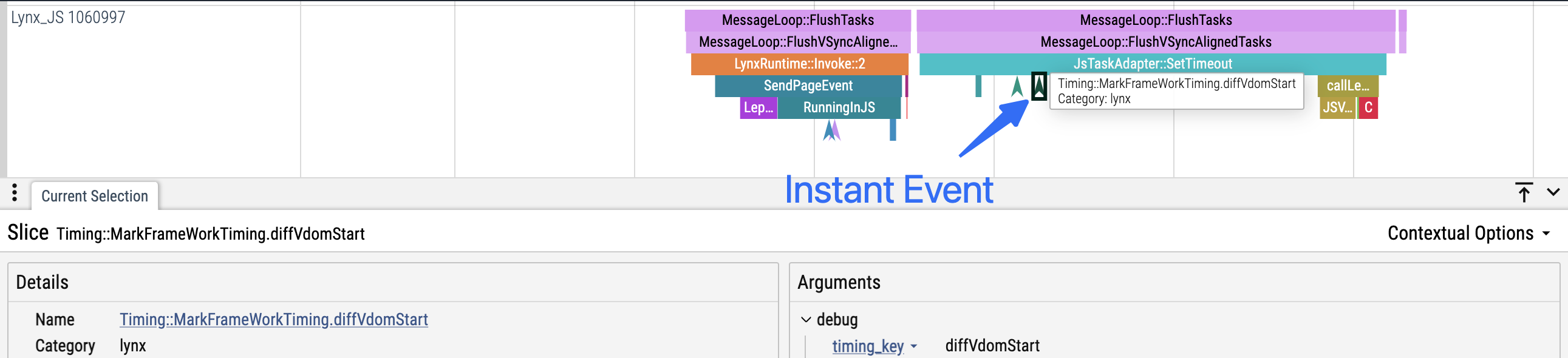
- Definition: Instant events have only a single timestamp and no duration. - Use case: Suitable for marking significant moments or points in your code (such as state changes, cross-thread/async boundaries, etc.).
// Basic usage
- (void)requestBegin {
  // ...
  [LynxTraceEvent instant:@"network" withName:@"request-begin"];
  // ...
}

// With custom arguments
- (void)requestFinished {
  // ...
  [LynxTraceEvent instant:@"network" withName:@"request-finished" debugInfo:@{@"url": @"https://example.com", @"method": @"GET"}];
  // ...
}#Best Practices
#Begin/End Must Match on the Same Thread
- Every
beginSectionmust have a correspondingendSection, and both calls must occur on the same thread. - Do not let exceptions or early returns prevent
endSectionfrom being called.
#Bad Examples
// Exception causes endSection not to be called
- (void)measureWithError:(BOOL)shouldThrow {
  [LynxTraceEvent beginSection:@"measure"];
  // ...
  @throw [NSException exceptionWithName:@"TestException" reason:@"Error occurred" userInfo:nil];
  // endSection will not be called due to exception
  [LynxTraceEvent endSection:@"measure"];
}

// Early return causes endSection not to be called
- (void)measureWithFastExit:(BOOL)fastExit {
  [LynxTraceEvent beginSection:@"measure"];
  // Early return, endSection not called
  if (fastExit) return;
  // ...
  [LynxTraceEvent endSection:@"measure"];
}

// Cross-thread begin/end mismatch
[LynxTraceEvent beginSection:@"background-task"];
dispatch_async(dispatch_get_global_queue(DISPATCH_QUEUE_PRIORITY_DEFAULT, 0), ^{
  // ...
  [LynxTraceEvent endSection:@"background-task"]; // Error: not same thread
});#Good Examples
- (void)measureWithError:(BOOL)shouldThrow {
  @try {
    [LynxTraceEvent beginSection:@"measure"];
    // ...
    @throw [NSException exceptionWithName:@"TestException" reason:@"Error occurred" userInfo:nil];
  }
  @finally {
    // Exception safe: ensure endSection is always called
    [LynxTraceEvent endSection:@"measure"];
  }
}

- (void)measureWithFastExit:(BOOL)fastExit {
  [LynxTraceEvent beginSection:@"measure"];
  if (fastExit) {
    // Early return safe
    [LynxTraceEvent endSection:@"measure"];
    return;
  }
  // ...
  [LynxTraceEvent endSection:@"measure"];
}

dispatch_async(dispatch_get_global_queue(DISPATCH_QUEUE_PRIORITY_DEFAULT, 0), ^{
  // Thread safe: begin/end on the same thread
  [LynxTraceEvent beginSection:@"background-task"];
  // ...
  [LynxTraceEvent endSection:@"background-task"];
});#Do Not Use Slice Events Across Async Boundaries
- Do not use
beginSection/endSectionacross asynchronous boundaries like timers or callbacks. - Slice events require start and end to be in the same synchronous context.
- Use Instant events if you need to trace both sides of an async boundary.
#Bad Examples
// Timer/callback
[LynxTraceEvent beginSection:@"async-function"];
dispatch_after(dispatch_time(DISPATCH_TIME_NOW, time), dispatch_get_main_queue(), ^{
    // ...
    [LynxTraceEvent endSection:@"async-function"];
});

// Async task
[LynxTraceEvent beginSection:@"await-task"];
[someAsyncFunction waitUntilFinished];
[LynxTraceEvent endSection:@"await-task"];#Good Examples
// Timer/callback: use begin/end inside callback
dispatch_after(dispatch_time(DISPATCH_TIME_NOW, time), dispatch_get_main_queue(), ^{
    [LynxTraceEvent beginSection:@"async-function"];
    // ...
    [LynxTraceEvent endSection:@"async-function"];
});

// Async task: use instant events
[LynxTraceEvent instant:@"async-task" withName:@"start"];
[someAsyncFunction waitUntilFinished];
[LynxTraceEvent instant:@"async-task" withName:@"end"];#Slice Events
- Definition: Slice events have both a start and end timestamp, representing a duration.
- Nesting: On the same thread, slice events can be nested like a call stack.
- For example, if event B starts after event A but before A ends, B is considered a child of A and will be displayed nested under A in the Trace UI.
- Important: Child events must always end before their parent ends (i.e., B must end before A).
- Use case: Suitable for profiling code sections where execution time matters.
// Basic usage
void measure() {
  TraceEvent.beginSection("render", "measure");
  // ... your code ...
  TraceEvent.endSection("render", "measure");
}

// With custom arguments
void draw() {
  Map<String, String> args = new HashMap<>();
  args.put("component", "Image");
  args.put("size", "large");
  TraceEvent.beginSection("render", "draw-image", args);
  // ... your code ...
  TraceEvent.endSection("render", "draw-image");
}#Instant Events
- Definition: Instant events have only a single timestamp and no duration.
- Use case: Suitable for marking significant moments or points in your code (such as state changes, cross-thread/async boundaries, etc.).
// Basic usage
void requestBegin() {
  // ...
  TraceEvent.instant("network", "request-begin");
  // ...
}

// With custom arguments
void requestFinished() {
  // ...
  Map<String, String> args = new HashMap<>();
  args.put("url", "https://example.com");
  args.put("method", "GET");
  TraceEvent.instant("network", "request-finished", args);
  //...
}#Best Practices
#Begin/End Must Match on the Same Thread
- Every
beginSectionmust have a correspondingendSection, and both calls must occur on the same thread. - Do not let exceptions or early returns prevent
endSectionfrom being called.
#Bad Examples
public void measure() throws Exception {
  TraceEvent.beginSection("measure");
  // ...
  exceptionFunction(); // May throw exception
  // endSection not called due to exception
  TraceEvent.endSection("measure");
}

public void measure(boolean fastExit) {
  TraceEvent.beginSection("measure");
  // Early return causes endSection not to be called
  if (fastExit) return;
  // ...
  TraceEvent.endSection("measure");
}

// Cross-thread: begin/end not in the same thread
TraceEvent.beginSection("background-task");
new Thread(() -> {
  // ...
  TraceEvent.endSection("background-task");
}).start();#Good Examples
public void measure() throws Exception {
  try {
    TraceEvent.beginSection("measure");
    // ...
    exceptionFunction();
  } finally {
    // Exception safe
    TraceEvent.endSection("measure");
  }
}

public void measure() {
  TraceEvent.beginSection("measure");
  if (fastExit) {
    // Early return safe
    TraceEvent.endSection("measure");
    return;
  }
  // ...
  TraceEvent.endSection("measure");
}

new Thread(() -> {
  // Thread safe: begin/end in the same thread
  TraceEvent.beginSection("background-task");
  // ...
  TraceEvent.endSection("background-task");
}).start();#Do Not Use Slice Events Across Async Boundaries
- Do not use
beginSection/endSectionacross asynchronous boundaries like timers or callbacks. - Slice events require start and end to be in the same synchronous context.
- Use Instant events if you need to trace both sides of an async boundary.
#Bad Examples
// Timer/callback
TraceEvent.beginSection("async-function");
new Handler().postDelayed(() -> {
  // ...
  TraceEvent.endSection("async-function");
}, 3000);

// Async task
TraceEvent.beginSection("await-task");
someAsyncFunction().get(); // Assume this is async wait
TraceEvent.endSection("await-task");#Good Examples
// Timer/callback: use begin/end inside callback
new Handler().postDelayed(() -> {
  TraceEvent.beginSection("async-function");
  // ...
  TraceEvent.endSection("async-function");
}, 3000);

// Async task: use instant events
TraceEvent.instant("async-task", "async-task-start");
someAsyncFunction().get();
TraceEvent.instant("async-task", "async-task-end");#Slice Events
- Definition: Slice events have both a start and end timestamp, representing a duration.
- Nesting: On the same thread, slice events can be nested like a call stack.
- For example, if event B starts after event A but before A ends, B is considered a child of A and will be displayed nested under A in the Trace UI.
- Important: Child events must always end before their parent ends (i.e., B must end before A).
- Use case: Suitable for profiling code sections where execution time matters.
// Basic usage
function measure() {
  TraceEvent.beginSection(TraceCategory.Other, "measure");
  // ... your code ...
  TraceEvent.endSection(TraceCategory.Other, "measure");
}

// With custom arguments
function draw() {
  const args: Record<string, string> = {
    "component": "Image",
    "size": "large"
  }
  TraceEvent.beginSection(TraceCategory.Other, "draw-image", args);
  // ... your code ...
  TraceEvent.endSection(TraceCategory.Other, "draw-image");
}#Instant Events
- Definition: Instant events have only a single timestamp and no duration.
- Use case: Suitable for marking significant moments or points in your code (such as state changes, cross-thread/async boundaries, etc.).
// Basic usage
function requestBegin() {
  // ...
  TraceEvent.instant(TraceCategory.Other, "request-begin")
  // ...
}

// With custom arguments
function requestFinished() {
  // ...
  const args: Record<string, string> = {
    "url": "https://example.com",
    "method": "GET"
  }
  TraceEvent.instant(TraceCategory.Other, "request-finished", args);
  //...
}#Best Practices
#Begin/End Must Match on the Same Thread
- Every
beginSectionmust have a correspondingendSection, and both calls must occur on the same thread. - Do not let exceptions or early returns prevent
endSectionfrom being called.
#Bad Examples
function measure() {
  TraceEvent.beginSection(TraceCategory.Other, 'measure');
  // ...
  throw new Error('Error occurred');
  // profileEnd not called due to exception
  TraceEvent.endSection(TraceCategory.Other, 'measure');
}

function measureWithFastExit(fastExit) {
  TraceEvent.beginSection(TraceCategory.Other, 'measure');
  // Early return causes profileEnd not to be called
  if (fastExit) return;
  // ...
  TraceEvent.endSection(TraceCategory.Other, 'measure');
}

// Cross-async/thread begin/end mismatch
TraceEvent.beginSection(TraceCategory.Other, 'background-task');
setTimeout(() => {
  // ...
  TraceEvent.endSection(TraceCategory.Other, 'background-task');
}, 1000);#Good Examples
function measure(shouldThrow) {
  try {
    TraceEvent.beginSection(TraceCategory.Other, 'measure');
    // ...
    throw new Error('Error occurred');
  } finally {
    // Exception safe: ensure profileEnd is always called
    TraceEvent.endSection(TraceCategory.Other, 'measure');
  }
}

function measureWithFastExit(fastExit) {
  TraceEvent.beginSection(TraceCategory.Other, 'measure');
  if (fastExit) {
    // Early return safe
    TraceEvent.endSection(TraceCategory.Other, 'measure');
    return;
  }
  // ...
  TraceEvent.endSection(TraceCategory.Other, 'measure');
}

setTimeout(() => {
  // Thread safe: begin/end in the same execution context
  TraceEvent.beginSection(TraceCategory.Other, 'background-task');
  // ...
  TraceEvent.endSection(TraceCategory.Other, 'background-task');
}, 0);#Do Not Use Slice Events Across Async Boundaries
- Do not use
beginSection/endSectionacross asynchronous boundaries such as timers, callbacks, orawait/Promise. - Slice events require start and end to be in the same synchronous context.
- Use Instant events if you need to trace both sides of an async boundary.
#Incorrect Examples
// Timer/callback
TraceEvent.beginSection(TraceCategory.Other, 'async function');
setTimeout(() => {
  // ...
  TraceEvent.endSection(TraceCategory.Other, 'async function');
}, 3000);

// await/promise
TraceEvent.beginSection(TraceCategory.Other, 'await-task');
await someAsyncFunc();
TraceEvent.endSection(TraceCategory.Other, 'await-task');#Correct Examples
// Timer/callback: use begin/end inside the callback
setTimeout(() => {
  TraceEvent.beginSection(TraceCategory.Other, 'async function');
  // ...
  TraceEvent.endSection(TraceCategory.Other, 'async function');
}, 3000);

// await/promise: use instant trace events
TraceEvent.instant(TraceCategory.Other, 'await-task:begin');
await someAsyncFunc();
TraceEvent.instant(TraceCategory.Other, 'await-task:end');#Slice Events
- Definition: Slice events have both a start and end timestamp, representing a duration.
- Nesting: On the same thread, slice events can be nested like a call stack.
- For example, if event B starts after event A but before A ends, B is considered a child of A and will be displayed nested under A in the Trace UI.
- Important: Child events must always end before their parent ends (i.e., B must end before A).
- Use case: Suitable for profiling code sections where execution time matters.
// Basic usage
function handleClick() {
  lynx.performance.profileStart('handle-click');
  // ... your code ...
  lynx.performance.profileEnd();
}

// With custom arguments
useEffect(() => {
  lynx.performance.profileStart('useEffect', {
    args: { count },
  });
  // ... your code ...
  lynx.performance.profileEnd();
}, [count]);#Instant Events
- Definition: Instant events have only a single timestamp and no duration.
- Use case: Suitable for marking significant moments or points in your code (such as state changes, cross-thread/async boundaries, etc.).
function fetchData() {
  // Basic usage
  lynx.performance.profileMark('fetch-data-begin');
  fetch(url).then((res) => {
    // With custom arguments
    lynx.performance.profileMark('fetch-data-end', {
      args: { url: 'https://example.com', method: 'GET' },
    });
  });
}#Flow Events
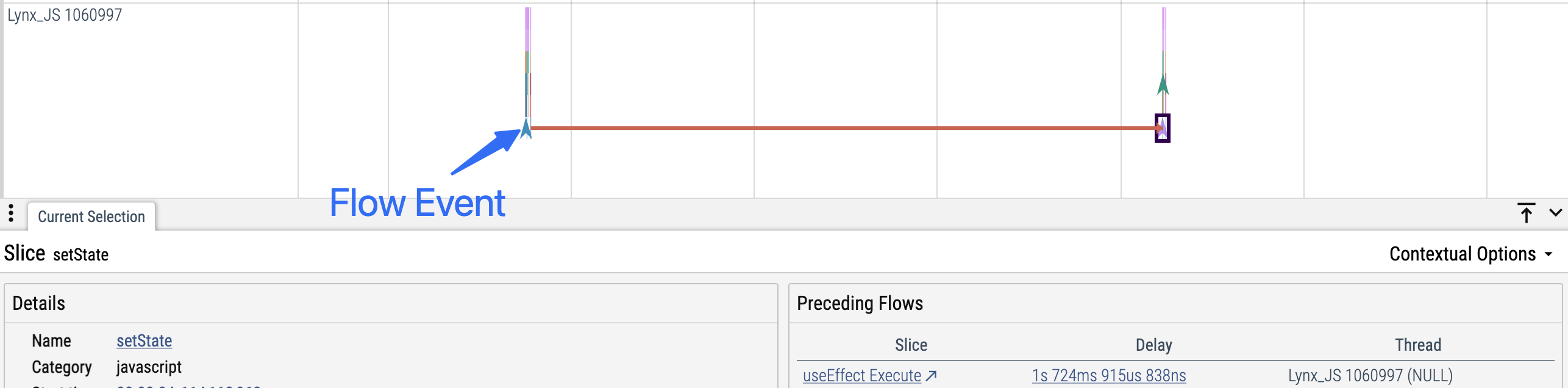
- Description: Flows are used to link two (or more) logically related events (Slice or Instant) that may occur on different threads or at different times.
- Visualization: In the Trace UI, flows are displayed as arrows connecting related events. When you select one event, the arrow highlights its related events.
- Use case: Flows are especially useful for tracking the lifecycle of asynchronous tasks, request/response pairs, or any operation spanning multiple phases or contexts.
const flowId = lynx.performance.profileFlowId();
lynx.performance.profileMark('user-action-begin', { flowId });

// ...later, in an async callback
setTimeout(() => {
  // ...
  lynx.performance.profileMark('user-action-end', { flowId });
}, 1000);#Best Practices
#Begin/End Must Match on the Same Thread
- Every
profileStartmust have a correspondingprofileEnd, and both calls must occur on the same thread. - Do not let exceptions or early returns prevent
profileEndfrom being called.
#Bad Examples
function measure() {
  lynx.performance.profileStart('measure');
  // ...
  throw new Error('Error occurred');
  // profileEnd not called due to exception
  lynx.performance.profileEnd();
}

function measureWithFastExit(fastExit) {
  lynx.performance.profileStart('measure');
  // Early return causes profileEnd not to be called
  if (fastExit) return;
  // ...
  lynx.performance.profileEnd();
}

// Cross-async/thread begin/end mismatch
lynx.performance.profileStart('background-task');
setTimeout(() => {
  // ...
  lynx.performance.profileEnd();
}, 1000);#Good Examples
function measure(shouldThrow) {
  try {
    lynx.performance.profileStart('measure');
    // ...
    throw new Error('Error occurred');
  } finally {
    // Exception safe: ensure profileEnd is always called
    lynx.performance.profileEnd();
  }
}

function measureWithFastExit(fastExit) {
  lynx.performance.profileStart('measure');
  if (fastExit) {
    // Early return safe
    lynx.performance.profileEnd();
    return;
  }
  // ...
  lynx.performance.profileEnd();
}

setTimeout(() => {
  // Thread safe: begin/end in the same execution context
  lynx.performance.profileStart('background-task');
  // ...
  lynx.performance.profileEnd();
}, 0);#Do Not Use Slice Events Across Async Boundaries
- Do not use
profileStart/profileEndacross asynchronous boundaries such as timers, callbacks, orawait/Promise. - Slice events require start and end to be in the same synchronous context.
- Use Instant events if you need to trace both sides of an async boundary.
#Incorrect Examples
// Timer/callback
lynx.performance.profileStart('async function');
setTimeout(() => {
  // ...
  lynx.performance.profileEnd();
}, 3000);

// await/promise
lynx.performance.profileStart('await-task');
await someAsyncFunc();
lynx.performance.profileEnd();#Correct Examples
// Timer/callback: use begin/end inside the callback
setTimeout(() => {
  lynx.performance.profileStart('async function');
  // ...
  lynx.performance.profileEnd();
}, 3000);

// await/promise: use instant trace events
lynx.performance.profileMark('async-task:start');
await someAsyncFunc();
lynx.performance.profileMark('async-task:end');