

flex
Introduction
The flex CSS shorthand property sets how a flex item will grow or shrink to fit the space available in its flex container. This property is a shorthand for the following CSS properties: flex-grow, flex-shrink, flex-basis.
Examples
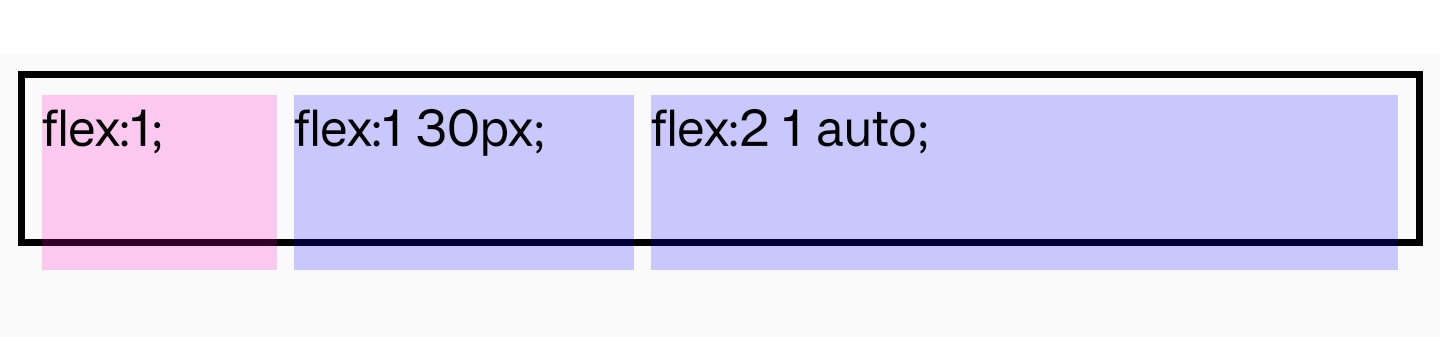
Syntax
The flex property may be specified using one, two, or three values.
-
One-value syntax:
- A unitless
<number>, which will be used as the value of<flex-grow>, then the shorthand expands toflex: <flex-grow> 1 0. - A valid
<length>or<percentage>or key wordauto, it will be used as the value of<flex-basis>, then the shorthand expands toflex: 1 1 <flex-basis>.
- A unitless
-
Two-value syntax:
- The first value must be a valid value for
<flex-grow>. - The second value must be one of:
- A unitless
<number>, which will be used as the value of<flex-shrink>, then the shorthand expands toflex: <flex-grow> <flex-shrink> 0. - A valid
<length>or<percentage>or key wordauto, it will be used as the value of<flex-basis>, then the shorthand expands toflex: <flex-grow> 1 <flex-basis>.
- A unitless
- The first value must be a valid value for
-
Three-value syntax: the values must be in the following order:
- A unitless
<number>, which will be used as the value of<flex-grow>. - A unitless
<number>, which will be used as the value of<flex-shrink>. - A valid
<length>or<percentage>or key wordauto, it will be used as the value of<flex-basis>.
- A unitless
Values
-
0 1 autoDefault value. The item is sized according to its width and height properties. It shrinks to its minimum size to fit the container, but does not grow to absorb any extra free space in the flex container.
-
autoThe item is sized according to its width and height properties, but grows to absorb any extra free space in the flex container, and shrinks to its minimum size to fit the container. This is equivalent to setting "
flex: 1 1 auto". -
noneThe item is sized according to its width and height properties. It is fully inflexible: it neither shrinks nor grows in relation to the flex container. This is equivalent to setting "
flex: 0 0 auto". -
<flex-grow>Defines the
flex-growof the flex item. Negative values are considered invalid. Defaults to 1 when omitted. -
<flex-shrink>Defines the
flex-shrinkof the flex item. Negative values are considered invalid. Defaults to 1 when omitted. -
<flex-basis>Defines the
flex-basisof the flex item. A preferred size of 0 must have a unit to avoid being interpreted as a flexibility. Defaults toautowhen omitted. (initial is auto)
Formal definition
| Initial value | as each of the properties of the shorthand:
|
| Applies to | flex items |
| Inherited | no |
| Animatable |
Formal syntax
Compatibility
LCD tables only load in the browser