

PipelineEntry
PipelineEntry is responsible for recording performance data at key moments during the Lynx Pipeline, specifically for Framework Rendering and Pixel Pipeline. It inherits from PerformanceEntry.
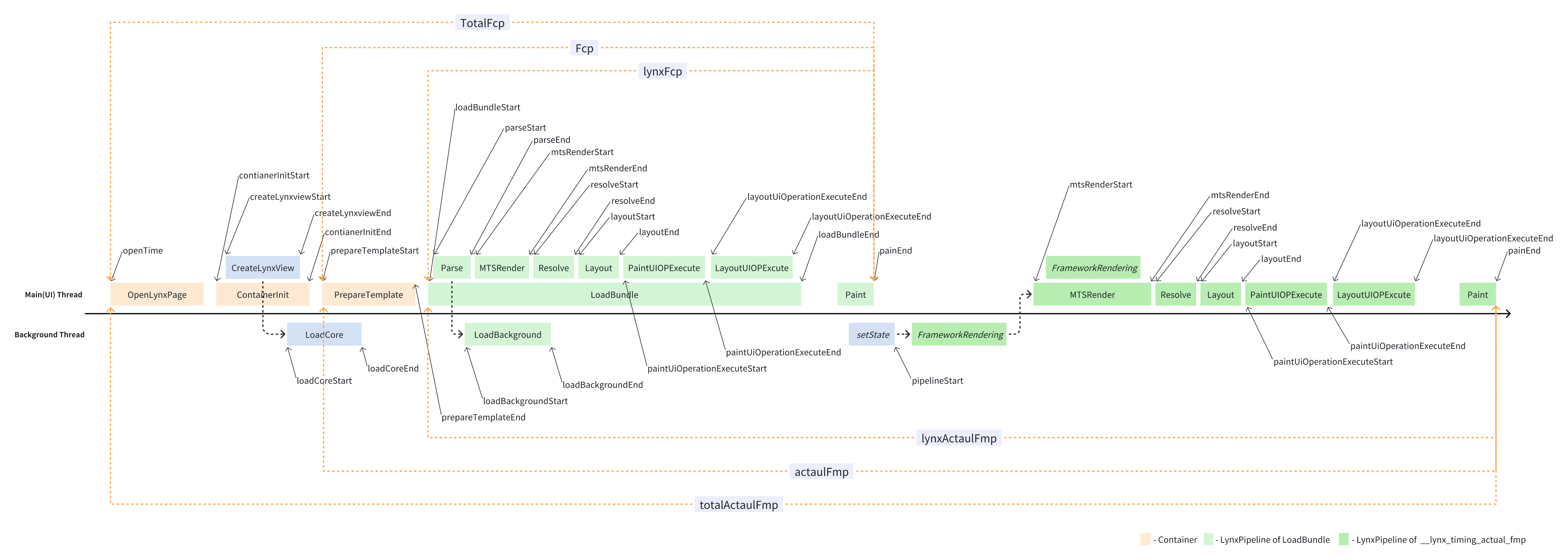
The Lynx Pipeline refers to the complete process from the trigger of rendering to the final display. This process is divided into four main parts: Load, Parse, Framework Rendering (FrameworkPipeline), and Engine Rendering (PixelPipeline).
Due to the frequent triggering of the Lynx Pipeline, the framework only records the following two cases:
- Lynx Pipeline marked with
__lynx_timing_flag, which generate performance data asPipelineEntry. - Lynx Pipeline triggered by loading and executing a TemplateBundle, which generate performance data as
LoadBundleEntry.
The following is the flowchart for PipelineEntry:
Example
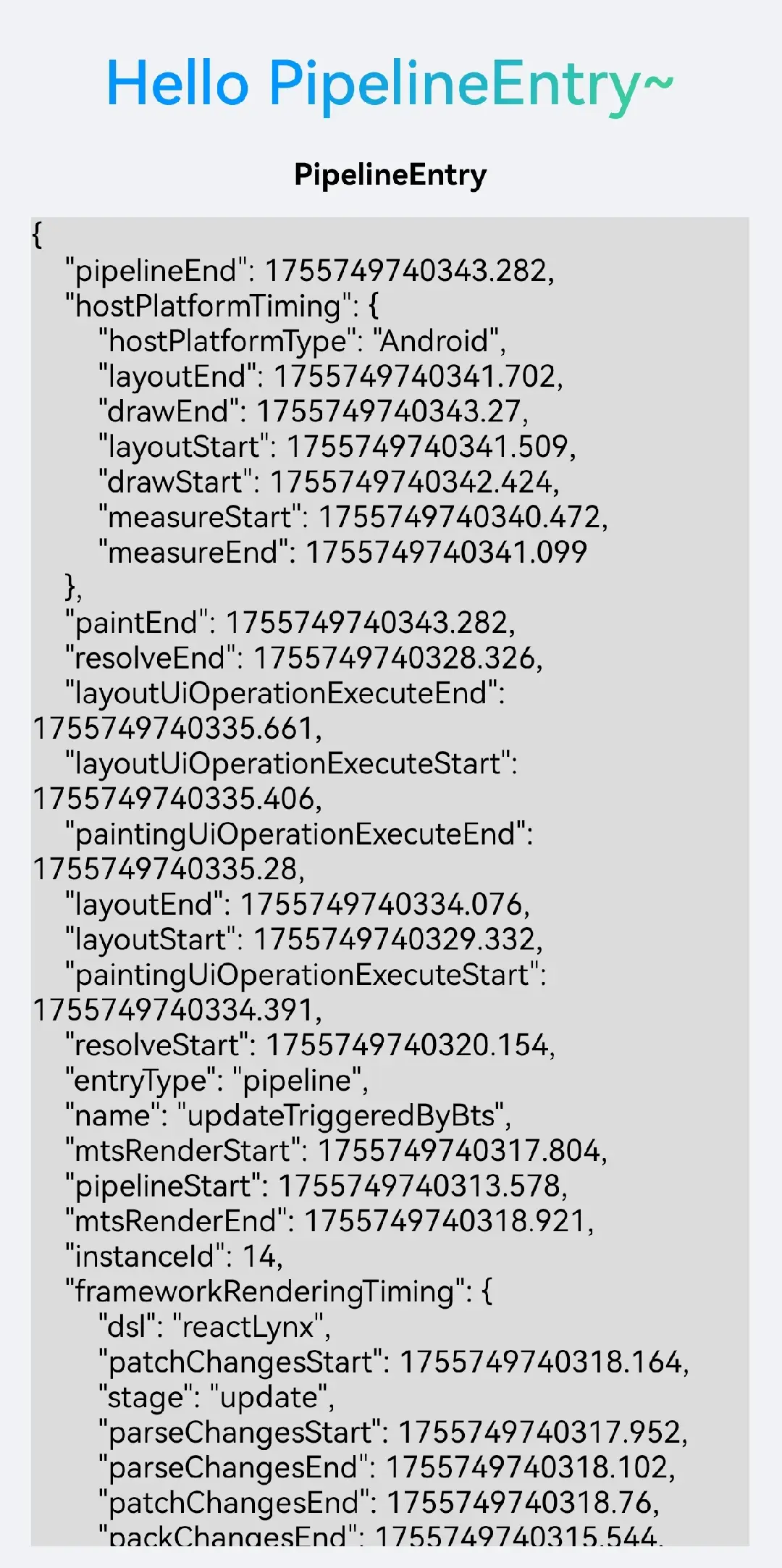
This example demonstrates how to generate and retrieve PipelineEntry.
Instance properties
entryType
The type of the performance event; the value for all instances of this class is fixed as pipeline.
name
The specific name of the performance event; used to distinguish the source of the Pipeline trigger. Possible values include:
loadBundlereloadBundleFromNativereloadBundleFromBtsupdateTriggeredByBtsupdateTriggeredByNativeupdateGlobalPropssetNativeProps
identifier
A marker for a particular Lynx Pipeline. It can have the following two values:
- For Lynx Pipelines marked with
__lynx_timing_flag,identifierequals the value of__lynx_timing_flag. - For Lynx Pipelines triggered by loading and executing a
TemplateBundle,identifieris an empty string.
pipelineStart
The timestamp for the start of the rendering pipeline. This timestamp is represented as a floating-point Unix timestamp (in milliseconds) with three decimal places. For example: 1739594612307.429.
pipelineEnd
The timestamp for the end of the rendering pipeline. This timestamp is represented as a floating-point Unix timestamp (in milliseconds) with three decimal places. For example: 1739594612307.429.
mtsRenderStart
The timestamp for the start of executing the main thread scripts to build the Element Tree. This timestamp is represented as a floating-point Unix timestamp (in milliseconds) with three decimal places. For example: 1739594612307.429.
mtsRenderEnd
The timestamp for the end of executing the main thread scripts to build the Element Tree. This timestamp is represented as a floating-point Unix timestamp (in milliseconds) with three decimal places. For example: 1739594612307.429.
resolveStart
The timestamp for the start of calculating Element styles. This timestamp is represented as a floating-point Unix timestamp (in milliseconds) with three decimal places. For example: 1739594612307.429.
resolveEnd
The timestamp for the end of calculating Element styles. This timestamp is represented as a floating-point Unix timestamp (in milliseconds) with three decimal places. For example: 1739594612307.429.
layoutStart
The timestamp for the start of layout calculations. This timestamp is represented as a floating-point Unix timestamp (in milliseconds) with three decimal places. For example: 1739594612307.429.
layoutEnd
The timestamp for the end of layout calculations. This timestamp is represented as a floating-point Unix timestamp (in milliseconds) with three decimal places. For example: 1739594612307.429.
paintingUiOperationExecuteStart
The timestamp for the start of executing UI operations related to painting. This timestamp is represented as a floating-point Unix timestamp (in milliseconds) with three decimal places. For example: 1739594612307.429.
paintingUiOperationExecuteEnd
The timestamp for the end of executing UI operations related to painting. This timestamp is represented as a floating-point Unix timestamp (in milliseconds) with three decimal places. For example: 1739594612307.429.
layoutUiOperationExecuteStart
The timestamp for the start of executing UI operations related to layout. This timestamp is represented as a floating-point Unix timestamp (in milliseconds) with three decimal places. For example: 1739594612307.429.
layoutUiOperationExecuteEnd
The timestamp for the end of executing UI operations related to layout. This timestamp is represented as a floating-point Unix timestamp (in milliseconds) with three decimal places. For example: 1739594612307.429.
paintEnd
The timestamp for the end of completing the final pixelation based on UI and UITree. This timestamp is represented as a floating-point Unix timestamp (in milliseconds) with three decimal places. For example: 1739594612307.429.
frameworkPipelineTiming
Performance data for key stages in Framework Rendering. The type is FrameworkPipelineTiming.
hostPlatformTiming
Performance data for platform-specific key stages in Lynx Pipeline, with type AndroidHostPlatformTiming | HarmonyHostPlatformTiming | IOSHostPlatformTiming.
actualFmp
The time taken from preparing a TemplateBundle to the completion of rendering elements and tags with __lynx_timing_flag="__lynx_timing_actual_fmp". The data type is PerformanceMetric.
Calculation formula: actualFmp = PipelineEntry.paintEnd - InitContainerEntry.prepareTemplateStart.
lynxActualFmp
The time taken from loading a TemplateBundle to the completion of rendering elements and tags with __lynx_timing_flag="__lynx_timing_actual_fmp". The data type is PerformanceMetric.
Calculation formula: lynxActualFmp = PipelineEntry.paintEnd - LoadBundleEntry.loadBundleStart.
totalActualFmp
The time taken from the user opening the page to the completion of rendering elements and tags with __lynx_timing_flag="__lynx_timing_actual_fmp". The data type is PerformanceMetric.
Calculation formula: totalActualFmp = PipelineEntry.paintEnd - InitContainerEntry.openTime.
Compatibility
LCD tables only load in the browser