

TouchEvent
Represents a touch event object, inherited from Event, used to describe the state changes of a finger on a touch surface (such as a touch screen), such as finger movement, click, long press, etc.
This event object contains one or more touch points, through which developers can understand the state changes of fingers on the touch surface.
Instance property
detail
Represents the touch point position of the first finger.
x: The horizontal axis position of the touch point in the currentLynxViewcoordinate system.y: The vertical axis position of the touch point in the currentLynxViewcoordinate system.
touches
Represents the Touch object currently on the touch plane. Each Touch object describes the touch point information of the corresponding finger. The format is as follows:
changedTouches
Indicates a Touch object whose state has changed compared to the last touch event, such as from nothing to something, position change, from something to nothing. The format of changesTouches is the same as that of touches.
TouchEvent type
touchstart
Indicates that the finger begins to touch the touch surface. target is the element that contains the touch point and is closest to the user.
touchmove
Indicates that the finger moves on the touch surface. target is always the same as target of touchstart.
touchend
Indicates that the finger leaves the touch surface. target is the same as target of touchstart. The touch point that has left the screen can be found in changedTouches.
touchcancel
Indicates that the touch event is interrupted by the system or Lynx external gesture, such as system pop-up window or incoming call. target is the same as target of touchstart. The interrupted touch point can be found in changedTouches.
tap
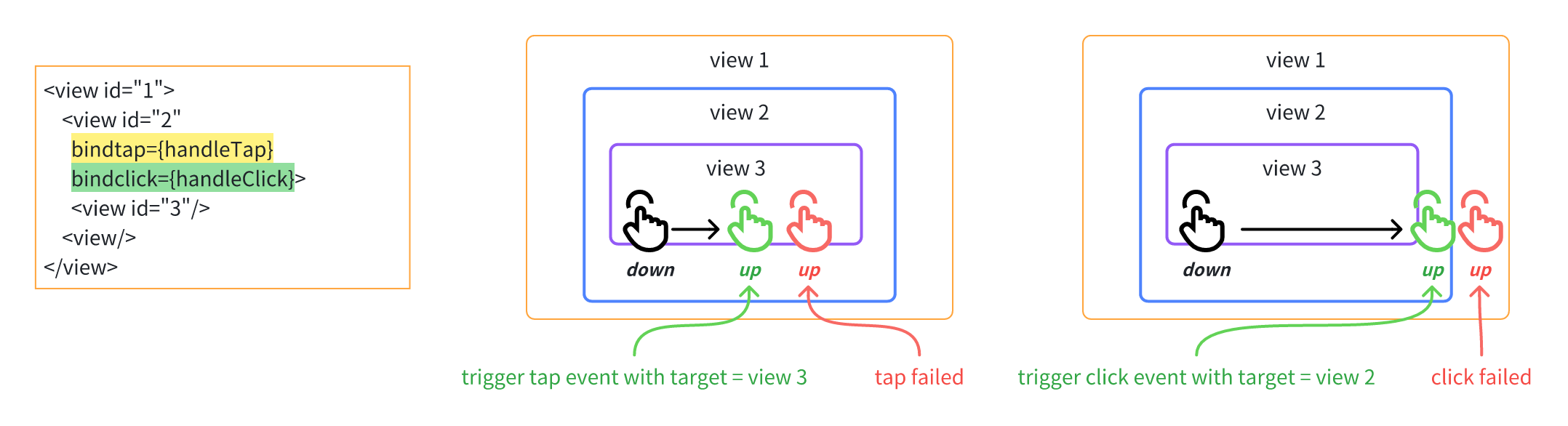
This indicates a single tap on the touch surface. The target is the element containing the touch point and closest to the user. Only the first finger can trigger this event.
If the finger moves beyond a certain distance threshold, or if an element in the event response chain slides, the tap event will not trigger.
This event and the longpress event are mutually exclusive in event listening. That is, if the front-end listens for both events simultaneously, they will not trigger concurrently; longpress takes precedence.
longpress
This indicates a long press on the touch surface. The target is the element containing the touch point and closest to the user. Only the first finger can trigger this event. The longpress event will not trigger if the finger moves beyond a certain threshold or the long press time interval is less than 500 ms.
click
This indicates a single click on the touch plane. target is the element containing the touch point, closest to the user, and listening for the click event. Only the first finger can trigger this event.
This event differs slightly from the tap event, primarily in its blocking distance threshold and the target:
-
The
targetfortapevent is the node closest to the user during the actual touch; while thetargetforclickevent is the node closest to the user that is listening for theclickevent. -
The blocking distance threshold for
tapevent is fixed; it won't trigger if the finger moves beyond a certain distance. The blocking distance threshold forclickevent depends on the touch hotspot oftarget; it won't trigger if the finger moves outside the touch hotspot. -
When an element slides on the
event response chaincorresponding totarget, thetaporclickevent cannot be triggered.
Compatibility
LCD tables only load in the browser